

If you’re building multi-turn conversations or agentic workflows, you’re probably re-sending the same tokens over and over again - tool definitions, system prompts, and conversation history. Every single request. That’s expensive.
Prompt caching lets you cache static content and pay just 10% of the normal input token price on subsequent requests. I ran an experiment using Anthropic Claude Sonnet 4.5 to see how much this actually saves in practice.
But first, a bit of background on how prompt caching works...
How Prompt Caching Works Under the Hood
When you send a request with caching enabled, Anthropic computes a hash of your prompt content up to each cache breakpoint (see the section below to understand what a cache breakpoint is). If that exact hash exists in the cache from a recent request, the system skips reprocessing those tokens entirely - it just loads the cached computation state and continues from there. This is why cache reads are so cheap (10% of base price): you’re not paying for the model to process those tokens again, just to retrieve the precomputed state.
The default cache lifetime is 5 minutes, but here’s the key detail: the cache refreshes for no additional cost each time it’s used. So if you’re actively conversing with the model and hitting the cache every minute or two, that 5-minute window keeps resetting. The cache only expires after 5 minutes of inactivity. For active conversations or agentic loops, this means your cache essentially stays warm indefinitely. Anthropic also offers a 1-hour TTL at a higher write cost (2x base price instead of 1.25x) for workflows where requests are more spread out.
Cache Breakpoints and the Hierarchy
A cache breakpoint is where you place cache_control: {”type”: “ephemeral”} in your request. It tells Anthropic: “cache everything from the start of the request up to this point.” You can have up to 4 breakpoints per request.
The cache follows a strict hierarchy: tools → system → messages. This ordering matters because caches are cumulative - each level builds on the previous ones. Here’s how invalidation works:
Change your tools? The entire cache invalidates (tools, system, and messages).
Change your system prompt? The tools cache survives, but system and messages caches invalidate.
Change a message? Tools and system caches survive, but the messages cache from that point forward invalidates.
This is why placing breakpoints strategically matters. If your tools rarely change but your system prompt updates daily, put separate breakpoints on each. That way, a system prompt change doesn’t force you to re-cache the tools.
One key difference from OpenAI: OpenAI caches prompts automatically with no configuration needed. Anthropic requires explicit cache_control breakpoints, giving you more control over what gets cached and when, but requiring more upfront thought about your caching strategy.
The Experiment
I set up a 7-turn conversation with Claude Sonnet 4.5 that included:
Tool definitions (~2K tokens of function schemas)
A detailed system prompt (~6K tokens of instructions and context)
Growing conversation history (accumulating with each turn)
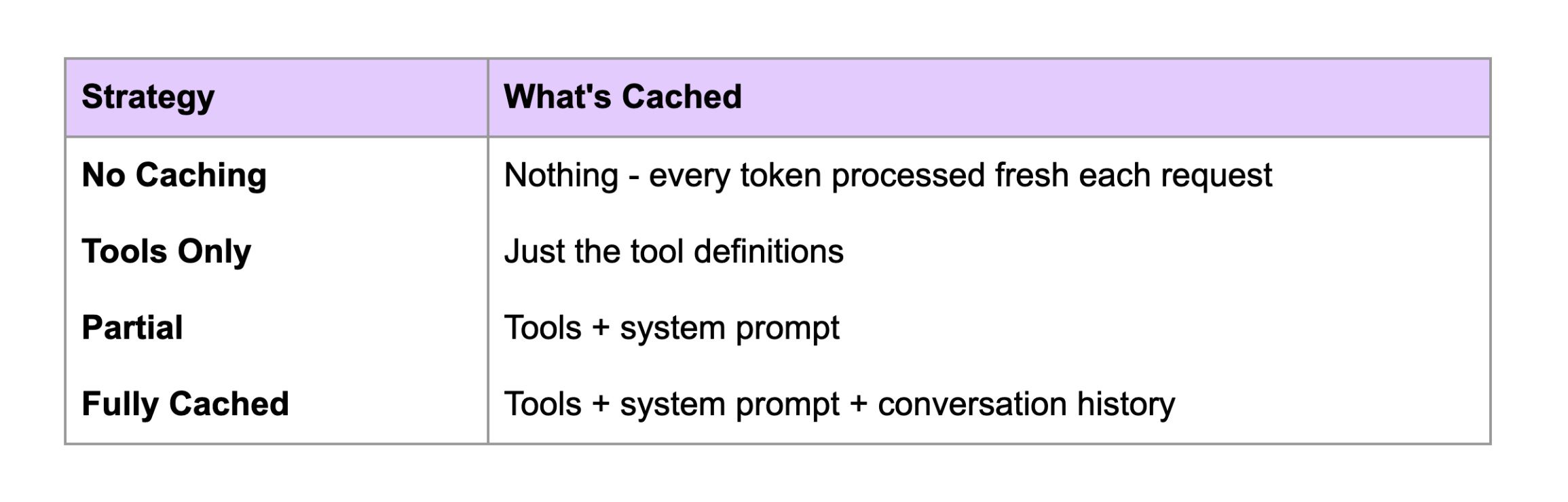
I ran the same conversation four different ways
The Results
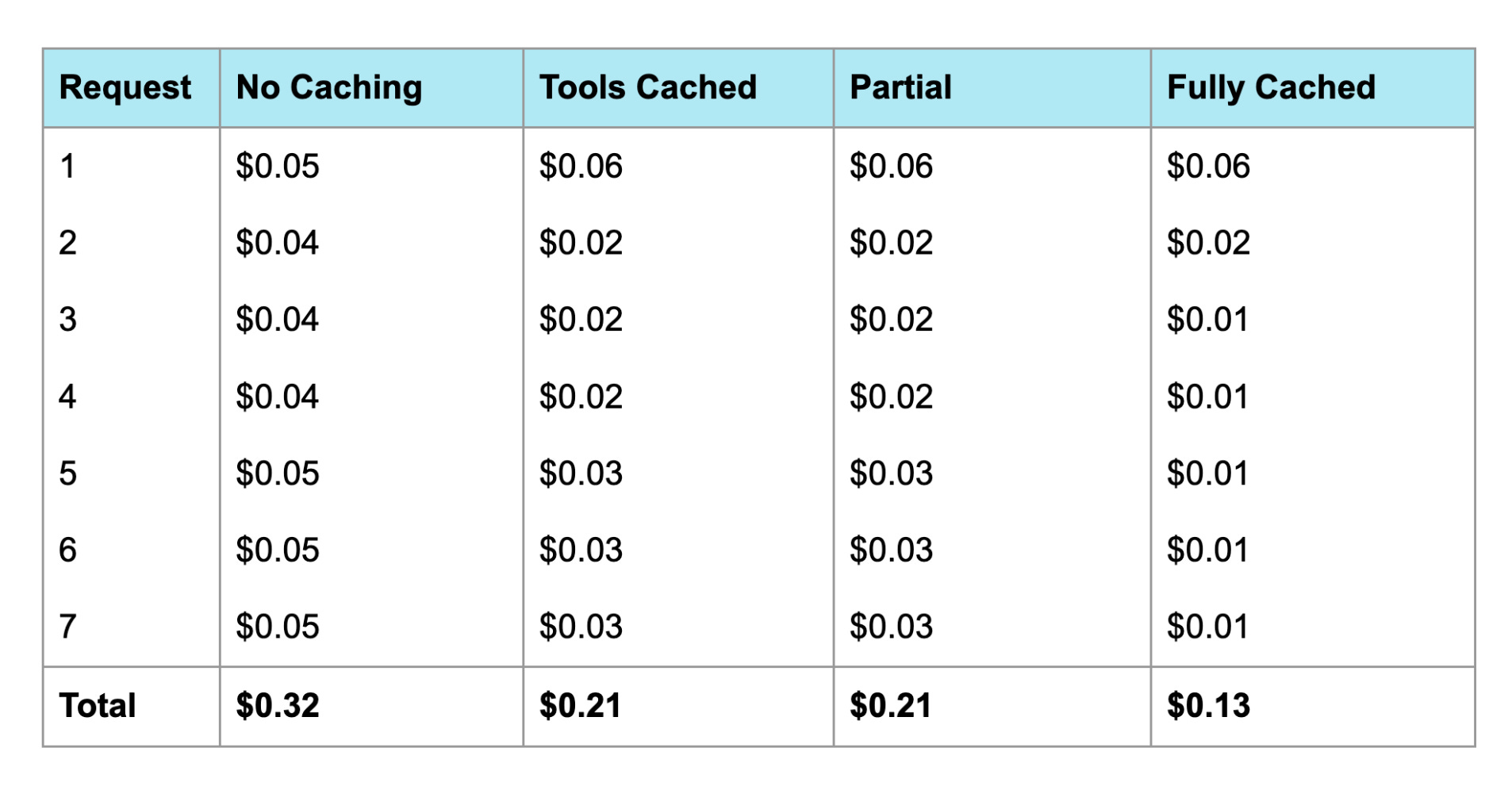
Here’s what each request cost across the four strategies:
Cost Breakdown
To see why caching wins, look at the economics:
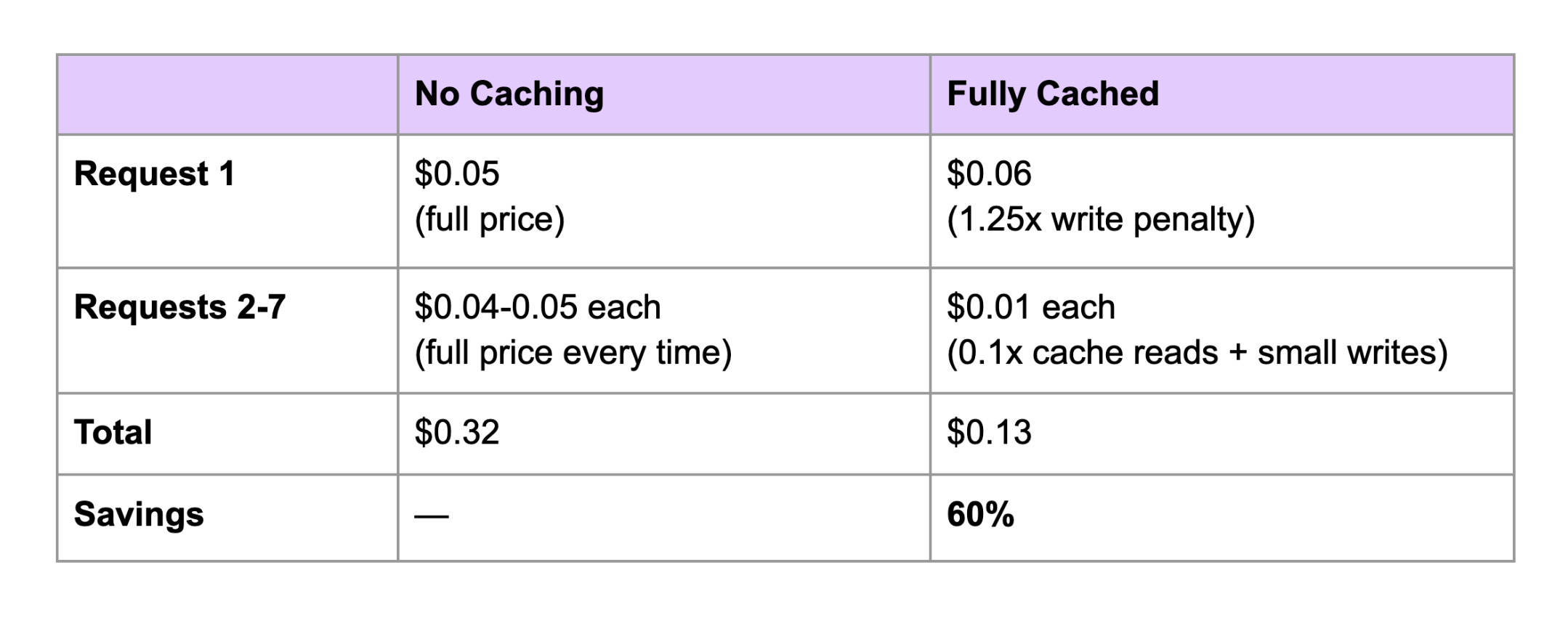
Without caching, you pay full price to process every token on every request. With caching, the first request pays a 25% premium to populate the cache. But every subsequent request reads those tokens at just 10% of the base price. Over a 7-turn conversation, the math overwhelmingly favors caching.
What’s Actually Happening Under the Hood
Let’s look at the cache behavior (tokens) for the fully cached strategy:
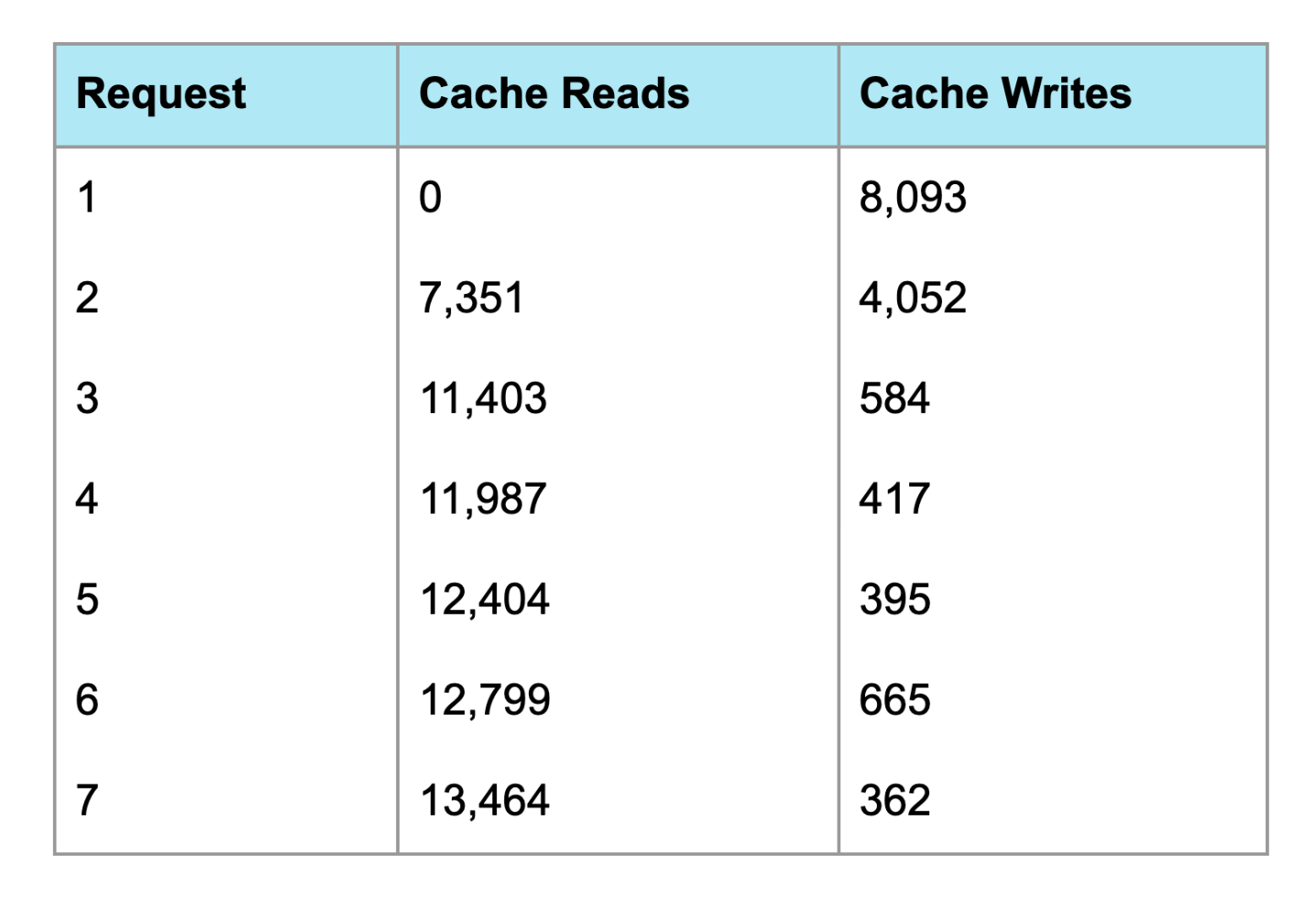
Request 1 is the “cold start” - nothing is cached yet, so we write 8,093 tokens to the cache. This actually costs more than no caching (cache writes are 1.25x the base input price).
Request 2 onward is where caching pays off. We’re reading thousands of tokens from cache at 0.1x the normal price, and only writing the new conversation turns.
By Request 7, we’re reading 13,464 tokens from cache and only writing 362 new tokens. That’s why the cost dropped to $0.01.
The Counterintuitive First Request
Notice that the first request with caching enabled ($0.06) actually costs more than without caching ($0.05). This is the cache write penalty - you pay 25% extra to populate the cache.
But this pays for itself immediately. By Request 2, the cached version is already cheaper ($0.02 vs $0.04), and the gap only widens from there.
The breakeven point is just 2 requests.
Why “Tools Only” and “Partial” Performed the Same
In my experiment, caching just tools vs. caching tools + system prompt showed identical costs. This is because both approaches left the conversation history uncached, and that’s what dominated the cost.
By Request 7, the fully cached experiment was reading 13,464 tokens from cache. The tools and system prompt together account for maybe 8K of those tokens. The remaining 5K+ is conversation history that accumulated over the 7 turns.
When you only cache the static prefix (tools, or tools + system), you’re still reprocessing that growing conversation history on every single request. The marginal savings from caching an extra few thousand tokens of system prompt gets swamped by the cost of reprocessing 10K+ tokens of conversation.
The real gains came from caching the conversation itself - that’s where the “fully cached” strategy pulled ahead.
Implementation Tips
Here’s the pattern that worked:
response = client.messages.create(
    model="claude-sonnet-4-5",
    max_tokens=4096,
    tools=[
        # ... your tools here ...
        {
            "name": "final_tool",
            "description": "...",
            "input_schema": {...},
            "cache_control": {"type": "ephemeral"}  # Cache breakpoint 1
        }
    ],
    system=[
        {
            "type": "text",
            "text": "Your detailed system prompt...",
            "cache_control": {"type": "ephemeral"}  # Cache breakpoint 2
        }
    ],
    messages=[
        # ... previous conversation turns ...
        {
            "role": "user",
            "content": [
                {
                    "type": "text",
                    "text": "Latest user message",
                    "cache_control": {"type": "ephemeral"} # Cache breakpoint 3
                }
            ]
        }
    ]
)
Key points:
Put cache_control on the last item in each section you want cached
The cache is hierarchical: tools → system → messages
Place your cache breakpoint at the end of each turn to incrementally cache the conversation
When to Use Prompt Caching
Caching makes sense when you have:
Long system prompts (instructions, examples, documentation)
Large context windows (RAG documents, code files)
Multi-turn conversations (chatbots, agents)
Repetitive tool definitions (same tools across many requests)
It’s especially powerful for agentic workflows where you might make 10-20 API calls in a single task, each building on the previous context.
The Bottom Line
For a 7-turn conversation:
No caching: $0.32
Full caching: $0.13
Savings: 60%
The cache writes cost extra on the first request, but you break even by Request 2 and save significantly from there. For any multi-turn application, prompt caching is essentially free money.
Experiment run with Claude Sonnet 4.5. Actual savings will vary based on your prompt structure and conversation length.